Git 4 graioners
... Git just want to have fun and you should too
by Marcia Paez Aballay, Ramiro Berruezo & Santiago Rojo

Agenda
- VCS
- Why Git?
- What's inside?
- What's a branch?
- Git commands
- Undoing stuffs
- Branches
- Branching model
- Remotes
- Merge
- Rebase
- Differences
- Configurations
- Applications and tools
What is a VCS?
“Version control is a system that records changes to a file or set of files over time so that you can recall specific versions later.”
But really, is something more like...
What kind of VCS exists?
Centralized vs. Decentralized vs. Distributed
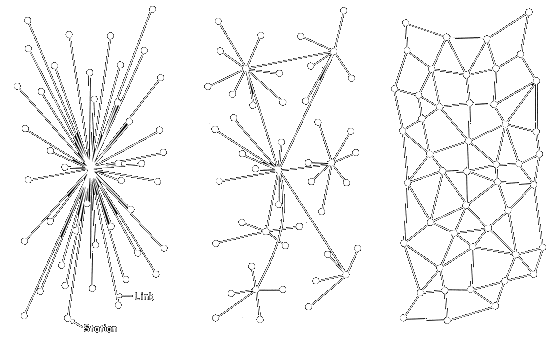
| Centralized | Distributed |
|---|---|
|
|

Why Git?
- Fully distributed
- Almost everything is local
- Works without network
- Every workstation is a backup
- Only adds data
- Branches
Git off-line
- Faster
- Diff between everything
- See the full log
- Commit changes
- Merge/Rebase branches
- Get a previous version of a file
- Switch branches
- and more
What's inside?
Where is my code?
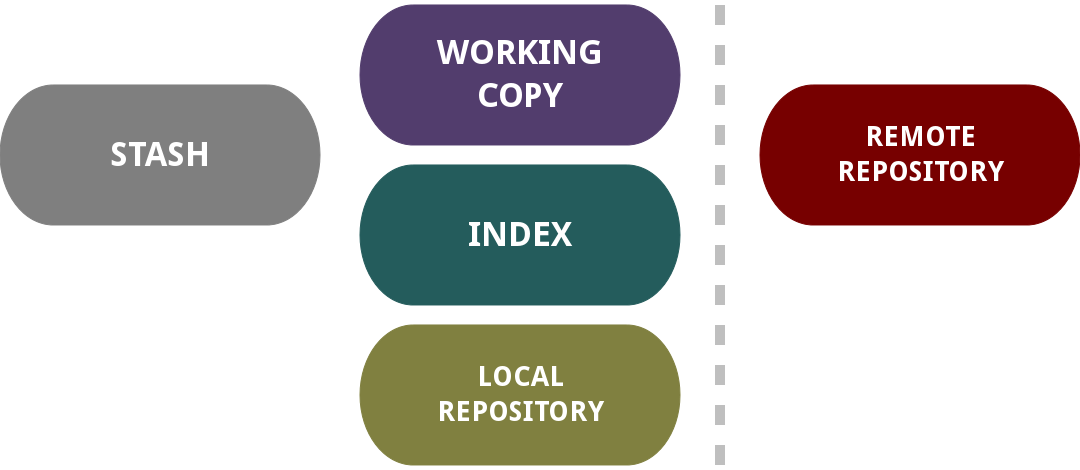
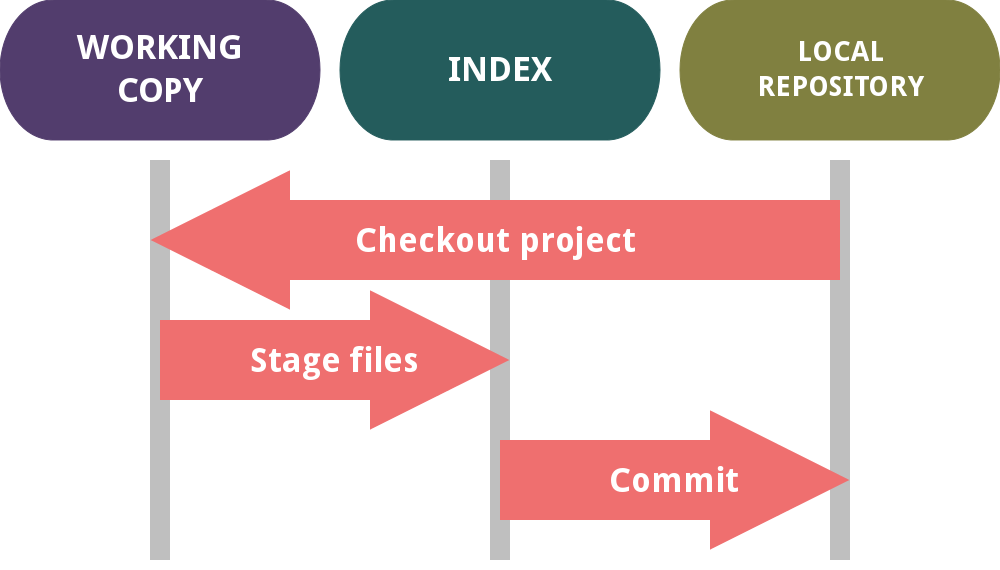
Workflow
What's a branch?
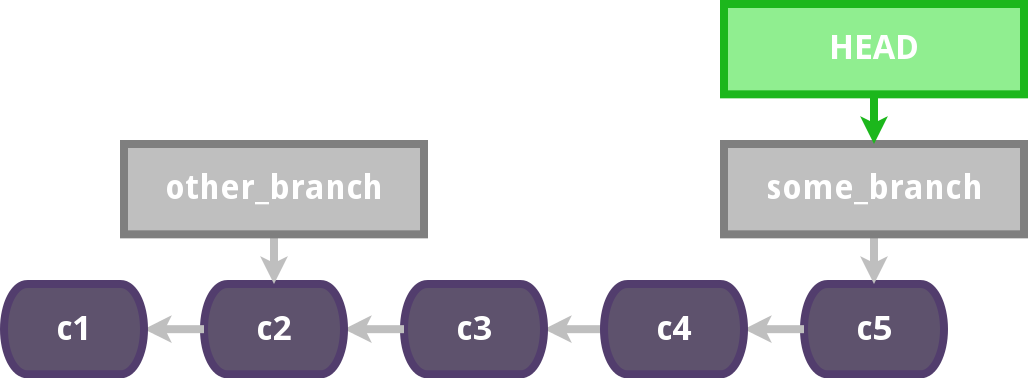
... are just pointers
... but HEAD is an important one.
Git commands
git help is your BFF :3
Initialize a repository
$ git init
Initialized empty Git repository in /home/tiagox/KeepGITSimple/.git/
Using an existing repository
$ git clone http://dev.graion.com/git/keepgitsimple
Cloning into 'keepgitsimple'...
...
Checking connectivity... done
Status
$ git status
# On branch master
# Changes to be committed:
#   (use "git reset HEAD <file>..." to unstage)
#
#       modified:   index.html
#
# Changes not staged for commit:
#   (use "git add <file>..." to update what will be committed)
#   (use "git checkout -- <file>..." to discard changes in working directory)
#
#       modified:   index.html
#
# Untracked files:
#   (use "git add <file>..." to include in what will be committed)
#
#       README.md
Adding files and changes
all
$ git add .
files
$ git add README.md
patterns
$ git add src/*.java
interactive (+1)
$ git add -p
Removing files and changes
files
$ git rm README.md
patterns
$ git rm src/*.java
clean untracked
$ git clean -f
Commiting changes
$ git commit
$ git commit -m "Commit message."
add + commit
$ git commit -am "Commit message."
Cherry picking
$ git cherry-pick 5123dad9ce82d6a91b2d027015bfe9d907dcda7b
Log
$ git log
$ git log --oneline --graph
* 9b26e2e Adds a comment.
* 1733561 Comment in main.c.
* 80c5d84 Standar main function signature.
* f10525b Add hello world message.
* 1b6a5ad Added backup files to .gitignore.
* 3a76a29 Added .gitignore.
* b63aa62 main file added.
* 1e2dde5 First commit.
what's in master but not in development
$ git log development..master
commit 1be40da451afae95451b47bc0d81309f31a65e5b
Author: Santiago Rojo <santiago.rojo@graion.com>
Date:   Thu Sep 5 16:49:04 2013 -0300

    Add HTML structure to index.html.
(╯°□°)╯︵ ┻━┻
DEMO TIME!
Get other's commits
$ git fetch origin
$ git merge origin/this_branch
$ git fetch origin
$ git rebase origin/this_branch
... or just
$ git pull origin
$ git pull origin --rebase

conflicts?
Caused by git pull/merge
$ git pull origin
CONFLICT!
$ git mergetool
# resolve
$ git commit
Caused by git pull/rebase
$ git pull origin --rebase
CONFLICT!
$ git mergetool
# resolve
$ git rebase --continue
if you just don't want any trouble
$ git rebase --abort

solved!
Share your commits
$ git push origin local_branch:remote_branch --set-upstream
don't be proud of use
$ git push origin local_branch:remote_branch --force
Undoing stuffs
git checkout
discarting changes
$ git checkout -- some_file
DISCLAIMER!
git reset
removing from stage
$ git reset HEAD some_file
undo last commit keeping changes
$ git reset HEAD~1
undo last commit discarting changes
$ git reset HEAD~1 --hard
... or you can space/time travel through your commits
$ git reset HEAD~4^3^^^2^1
$ git reset other_branch
$ git reset origin/this_branch
Branches
... again
Create branches
$ git branch playground
$ git checkout -b development
Switched to a new branch 'development'
Delete branches
$ git branch -d playground
$ git branch -D playground
List branches
$ git branch
* development
  master
  playground
Switch branches
to another branch
$ git checkout playground
Switched to branch 'playground'
... or go anywhere
$ git checkout 5123dad9ce82d6a91b2d027015bfe9d907dcda7b
Note: checking out '5123dad9ce82d6a91b2d027015bfe9d907dcda7b'.

You are in 'detached HEAD' state. You can look around, make experimental
changes and commit them, and you can discard any commits you make in this
state without impacting any branches by performing another checkout.

If you want to create a new branch to retain commits you create, you may
do so (now or later) by using -b with the checkout command again. Example:

  git checkout -b new_branch_name

HEAD is now at 5123dad... Add index file.
Stashing
$ git stash
$ git stash save "Comments"
$ git stash list
$ git stash apply
$ git stash drop
apply + drop
$ git stash pop
Branching model
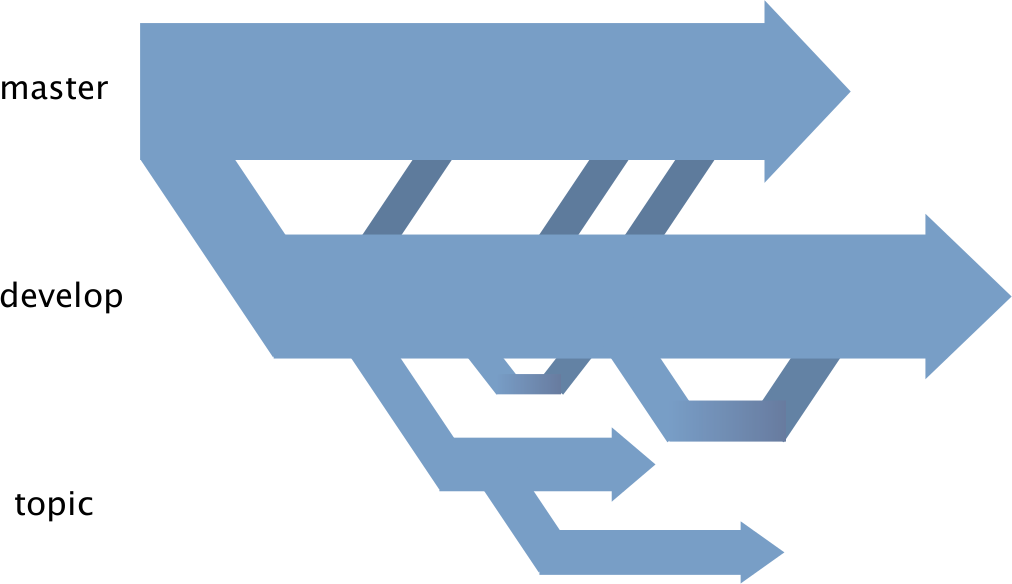
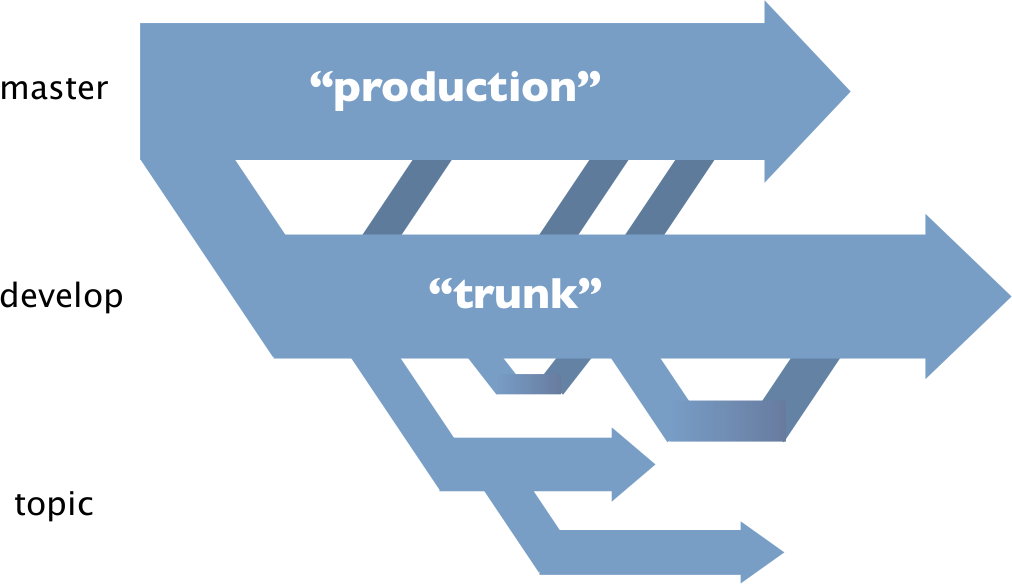
Use case

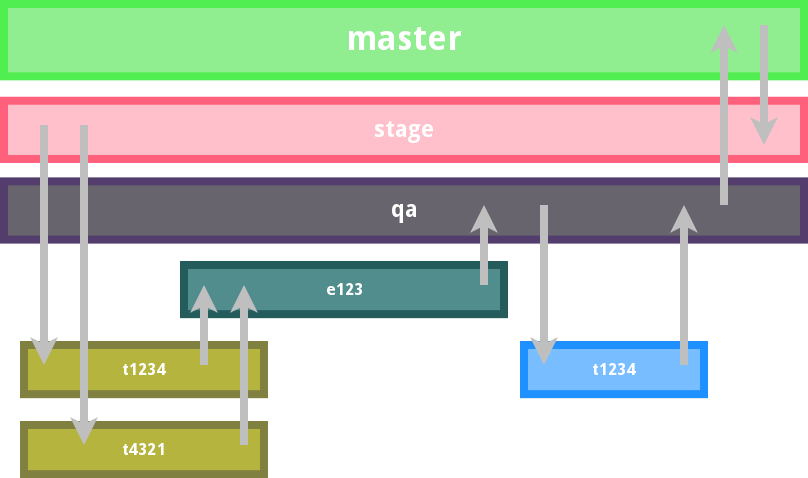
Remotes
Add remotes
$ git remote add graion http://dev.graion.com/git/keepgitsimple
List remotes
$ git remote
origin
graion
Show remote details
$ git remote show graion
* remote graion
  Fetch URL: http://dev.graion.com/git/keepgitsimple
  Push  URL: http://dev.graion.com/git/keepgitsimple
  HEAD branch: master
  Remote branches:
    development   tracked
    master        tracked
  Local branches configured for 'git pull':
    development   rebases onto remote development
    master        merges with remote master
  Local refs configured for 'git push':
    development   pushes to development (up to date)
    master        pushes to master      (up to date)
Merge
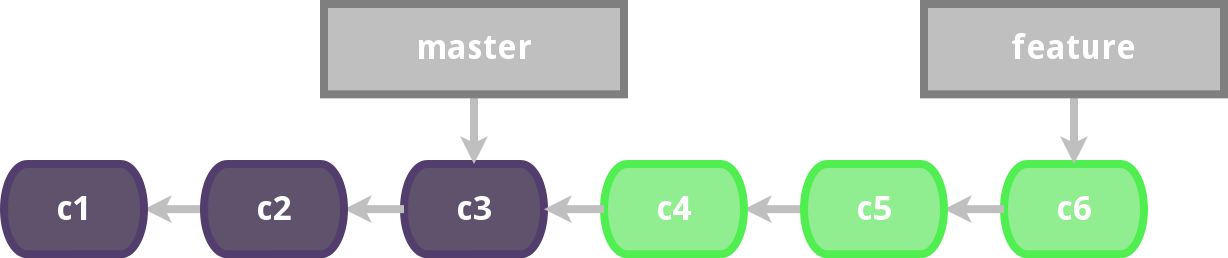
$ git checkout master
Switched to a new branch 'master'
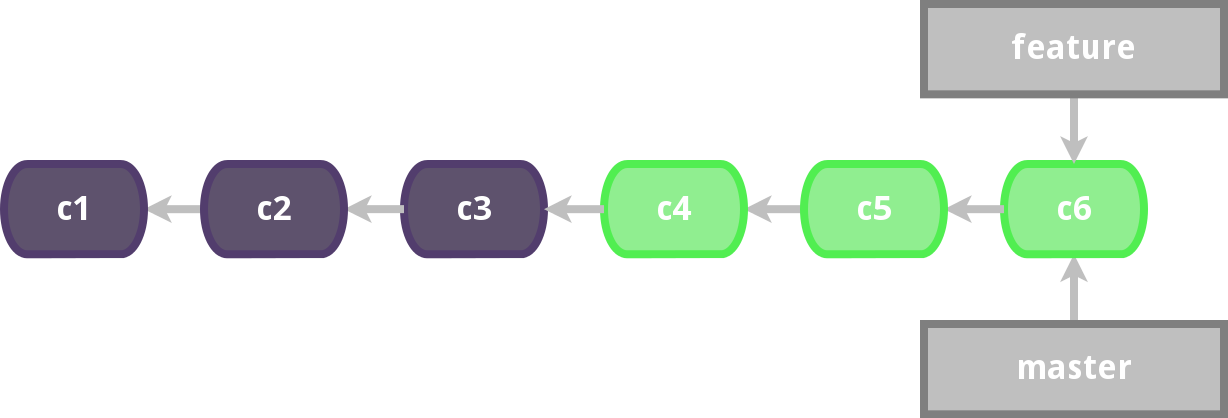
$ git merge feature
$ git merge feature
Updating 306eb60..56a2247
Fast-forward
 index.html | 3 ++-
 1 file changed, 2 insertions(+), 1 deletion(-)
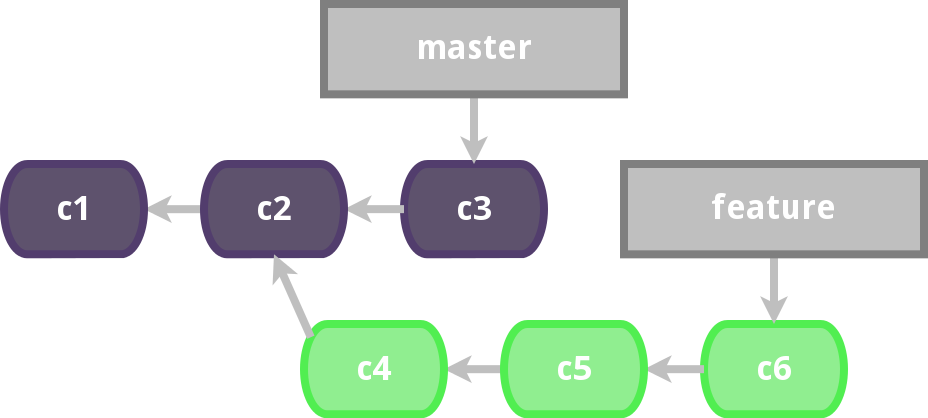
$ git checkout master
Switched to a new branch 'master'
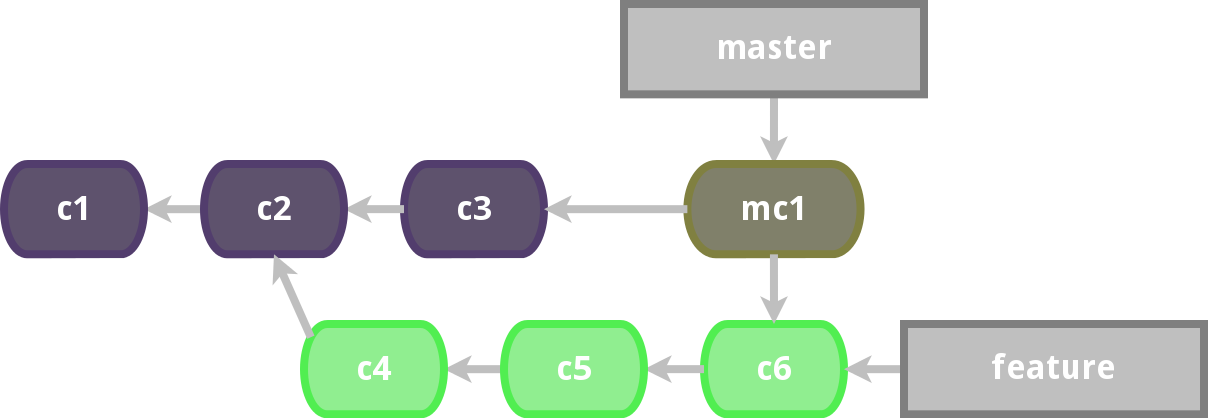
$ git merge feature
$ git merge feature
Auto-merging index.html
Merge made by the 'recursive' strategy.
 index.html | 2 +-
 1 file changed, 1 insertion(+), 1 deletion(-)
Fast-forward
Recursive strategy
Rebase
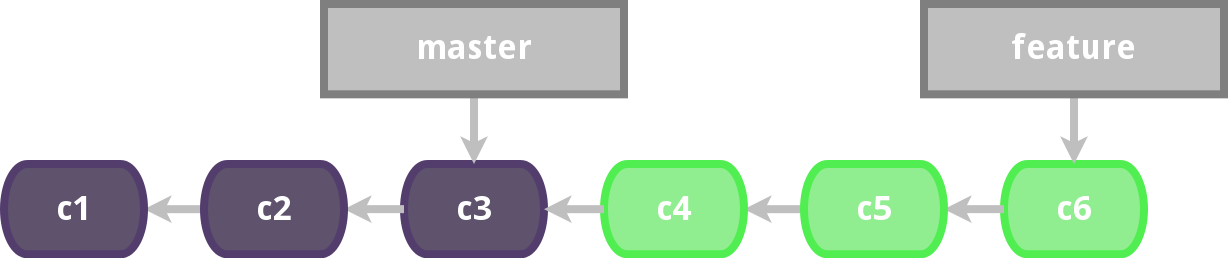
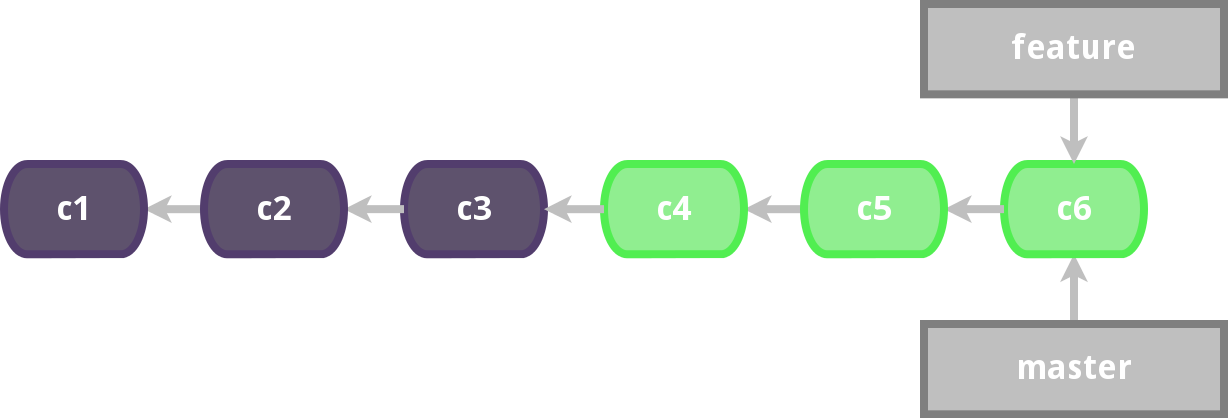
$ git checkout master
Switched to a new branch 'master'
$ git rebase feature
$ git rebase feature
First, rewinding head to replay your work on top of it...
Fast-forwarded master to feature.
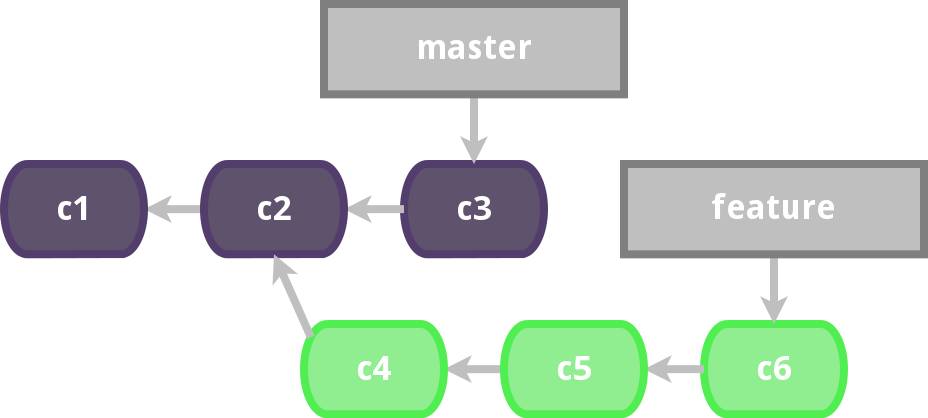
$ git checkout master
Switched to branch 'master'
$ git rebase feature
$ git rebase feature
First, rewinding head to replay your work on top of it...
Applying: c3
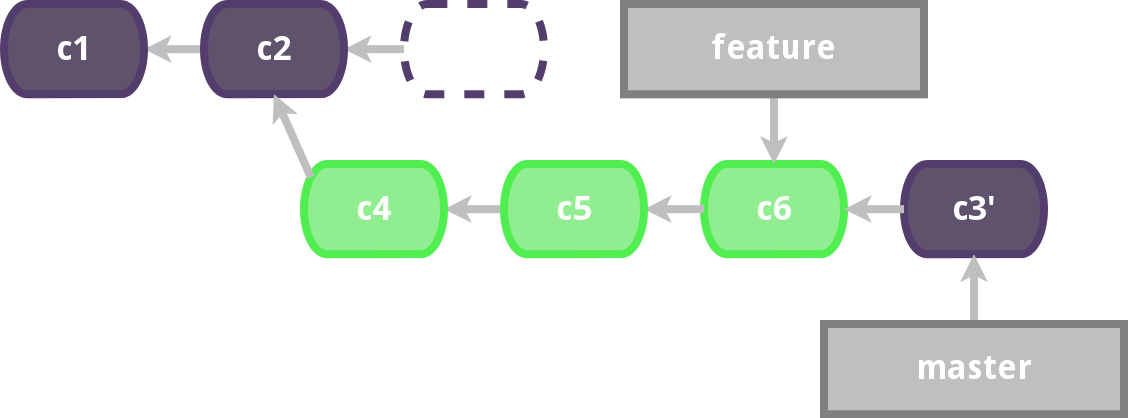
DON'T
let's try again
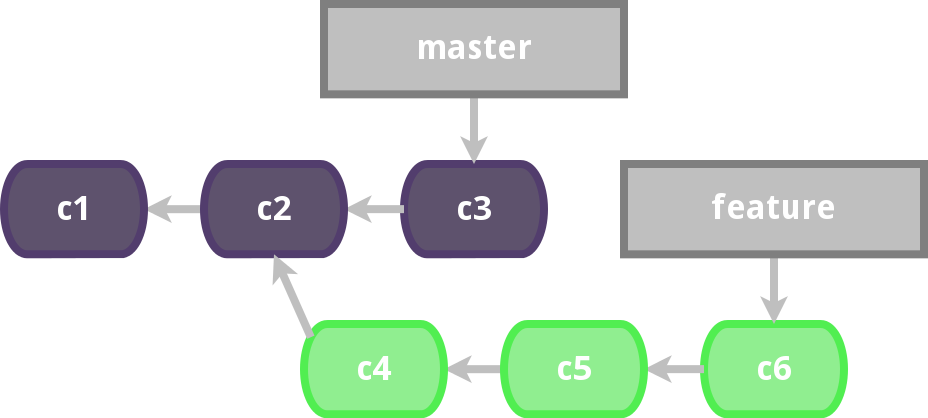
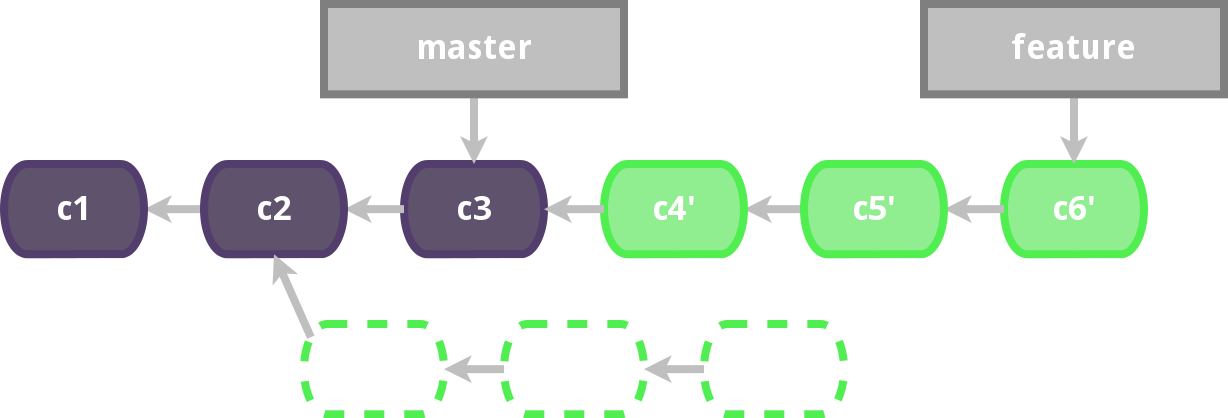
$ git checkout feature
Switched to branch 'feature'
$ git rebase master
$ git rebase master
First, rewinding head to replay your work on top of it...
Applying: c4
Applying: c5
Applying: c6
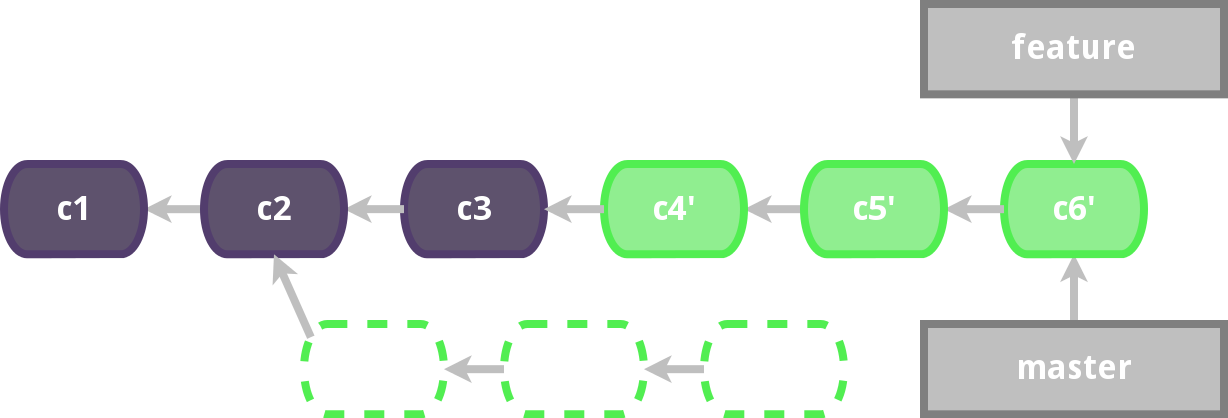
$ git checkout master
Switched to branch 'master'
$ git merge feature
Updating 306eb60..56a2247
Fast-forward
 index.html | 3 ++-
 1 file changed, 2 insertions(+), 1 deletion(-)
Wrong rebase
Rebase-Merge
Differences
Local changes
$ git diff
$ git diff --staged
Between branches
$ git diff this_branch other_branch
$ git diff this_branch other_branch -- some_file
$ git diff this_branch:some_file other_branch:some_file
... order matters
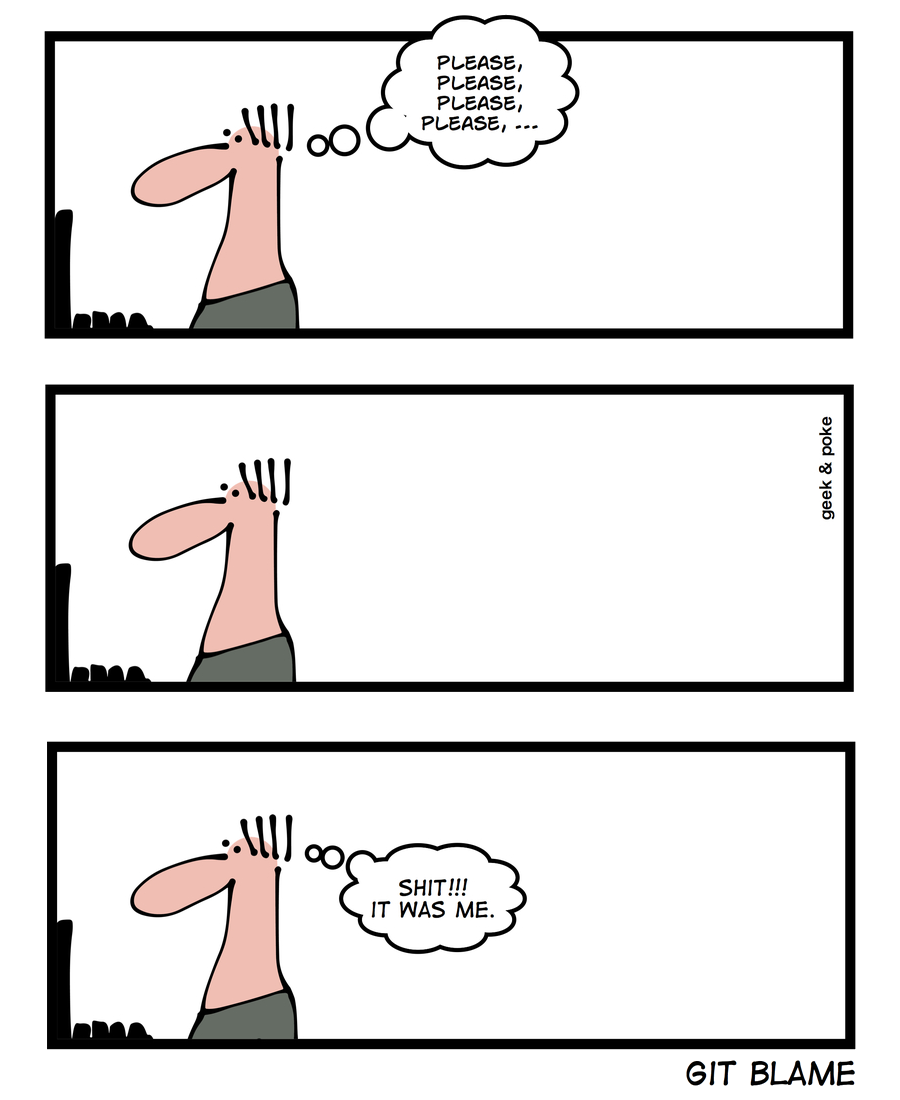
Whose fault is it?
$ git blame main.c
f10525b3 (Ramiro Berruezo 2013-01-19 12:24:25 -0300 1) #include <stdio.h>
f10525b3 (Ramiro Berruezo 2013-01-19 12:24:25 -0300 2)
80c5d84a (Marcia Paez     2013-01-18 14:16:03 -0300 3) int main (void) {
b63aa62d (Santiago Rojo   2013-01-18 12:20:12 -0300 4)
f10525b3 (Ramiro Berruezo 2013-01-19 12:24:25 -0300 5)    printf("Hello world!");
b63aa62d (Santiago Rojo   2013-01-18 12:20:12 -0300 6)    return 0;
b63aa62d (Santiago Rojo   2013-01-18 12:20:12 -0300 7)
b63aa62d (Santiago Rojo   2013-01-18 12:20:12 -0300 8) }
b63aa62d (Santiago Rojo   2013-01-18 12:20:12 -0300 9)
Configurations
One time configurations
$ git config --global user.name "Santiago Rojo"
$ git config --global user.email santiago.rojo@graion.com
$ git config --global color.ui true
$ git config --global merge.tool meld
$ git config credential.helper store
$ git config --global --list
Alias
$ git config --global alias.lol "log --oneline --graph"
$ git lol
*   9d36fd6 Merge branch 'helloworld'
|\
| * 28ebd5c Add hello world message.
* | 3a76a29 Added .gitignore.
|/
* 1e2dde5 First commit.
... or even more cool.
$ git config --global alias.gol "log --graph --pretty=format:'%Cred%h%Creset - %C(blue)%an%Creset
%C(yellow)%d%Creset %s %Cgreen(%cr)%Creset' --abbrev-commit --date=relative"
$ git gol
*   9d36fd6 - Santiago Rojo  (HEAD, master, helloworld) Merge branch 'helloworld' (11 months ago)
|\
| * 28ebd5c - Santiago Rojo  (tag: just-branched) Add hello world message. (11 months ago)
* | 3a76a29 - Santiago Rojo  Added .gitignore. (11 months ago)
|/
* 1e2dde5 - Santiago Rojo  First commit. (11 months ago)
Ignoring things
.gitignore.git/info/exclude
.netbeans
.DS_Store
*.o
*.dll
!main.dll
*.class
Applications and tools
Linux
$ sudo apt-add-repository ppa:pdoes/ppa
$ sudo apt-get update
$ sudo apt-get install git gitk
Windows
- http://git-scm.com/download/win
- Next, next, next...
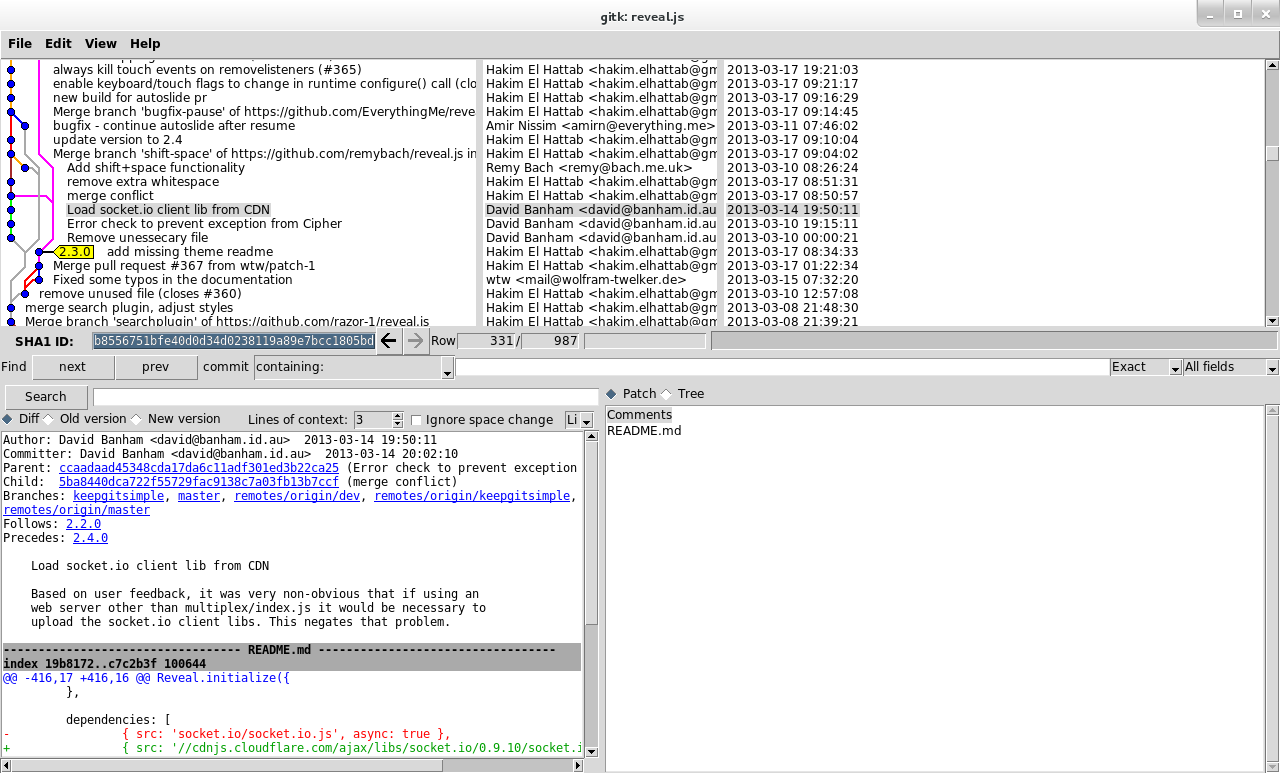
gitk
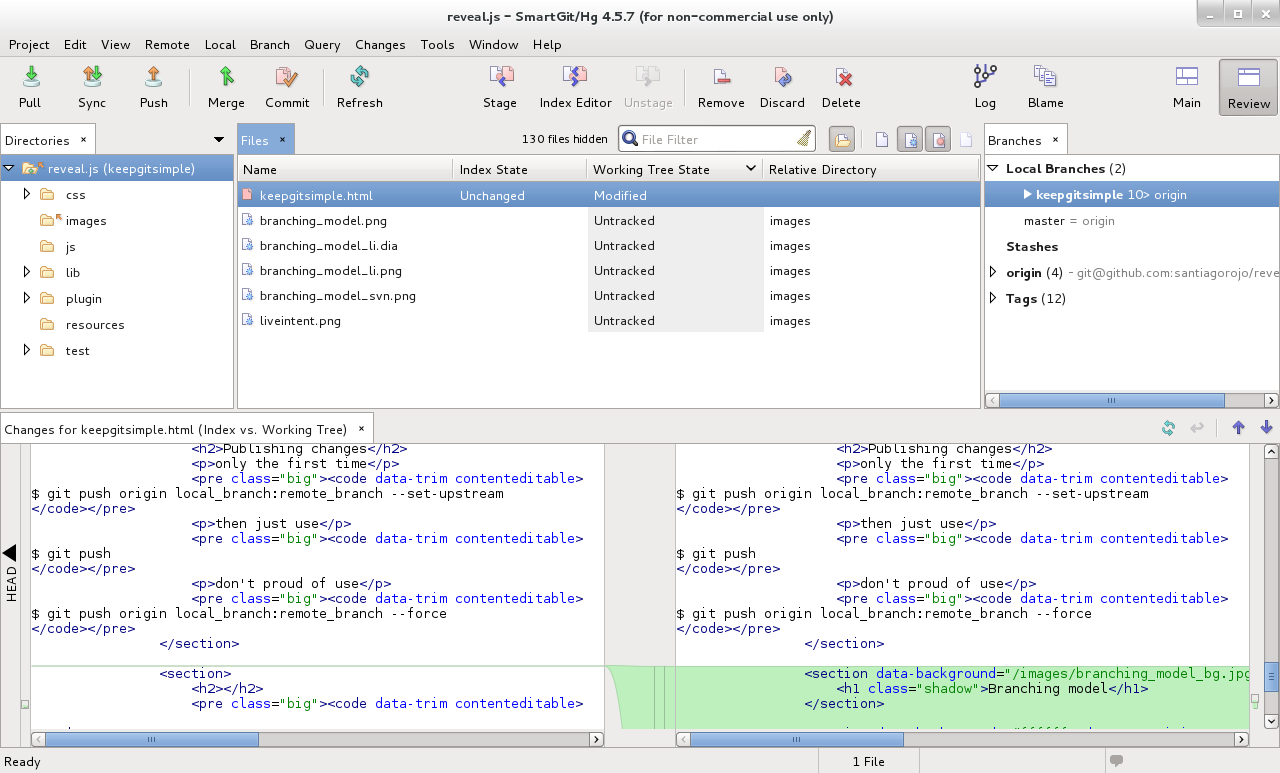
SmartGit
Links
- Git official site (http://git-scm.com)
- Try Git (http://try.github.io/)
- LearnGitBranching (http://pcottle.github.io/learnGitBranching/)
- Interactive cheatsheet (http://ndpsoftware.com/git-cheatsheet.html)
- Git ready (http://gitready.com/)